1
SED1560 Series
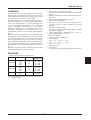
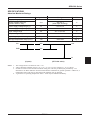
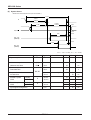
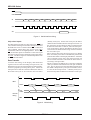
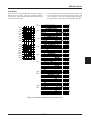
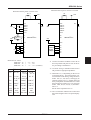
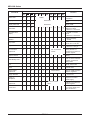
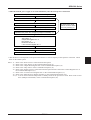
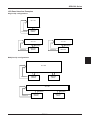
• When the built-in power supply is not used immediately after the main power is turned on:
Turn VDD and VSS power on with RES terminal being set to “L”.
Wait until the power supply is stabilized.
Cancel the reset mode (RES terminal = “H”)
Turn on the initial setup mode (Default) *1
The power save mode
must be turned on within
5 ms from powering on.
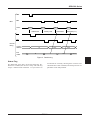
Implement the power save sequence (multiple commands) *11
Function select through the commands (user setup)
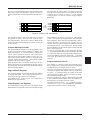
ADC select *2
Output state register set *3
Duty select *4
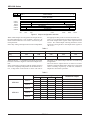
Electronic volume *6
n-line inversion register set *7
Implement the power save cancel sequence *12
Initial setup is complete
* This duration of 5 ms depends on the panel characteristics as well as capacity of the capacitor concerned. Check
them on the actual system.
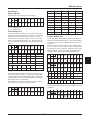
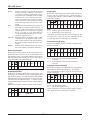
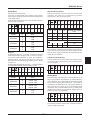
Notes: *1:
*2:
*3:
*4:
*6:
Refer to the “Reset Circuit” in the Function Description.
Refer to the “ADC Select” in the Command Description (8).
Refer to the “Output State Register Set” in the Command Description (18)
Refer to the “Duty Select” in the Command Description (11).
Refer to the “Supply Circuit” in the Function Description and the “Electronic Volume Register Set” in
the Command Description (21).
*7: Refer to the “n-line Inversion Register Set” in the Command Description (13).
*8: Refer to the “Built-in Power Supply ON/OFF” in the Command Description (19).
*11,12: You can select either the sleep mode or standby mode for the power save mode. Refer to the “Power
Save (Multiple Commands)” in the Command Description (22).
EPSON
7–49