1
Chapter 4 Playing Digital Media Files
Save/Cancel -
- To cause the changes made in the WIFI Setup screen
to activate on the Player, highlight the “Save” button and press Enter on the
remote. The changes will be activated. If the user chooses to cancel any changes
made in the Options screen before selecting “Save,” highlight the “Cancel” button
and press Enter on the remote. No changes will be made.
Check Signal Strength -
- To check the signal strength of the
wireless network, highlight the “Check signal strength” button and press Enter
on the remote. Signal and noise amounts will appear onscreen. To stop, highlight
the “Stop signal strength check” button and press Enter on the remote.
Time Setup
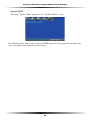
Selecting “Time Setup” generates the Time Setup screen.
Here, the user can change various aspects of the time settings of the Player, including time servers (if the Player is online), time zone, and daylight savings time.
55