1
If you have a question:
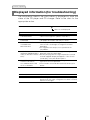
Displayed information (for troubleshooting)
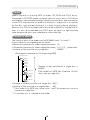
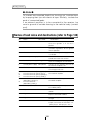
The information listed in the chart below is displayed to show the
status of the CD player and CD changer. Refer to the chart for the
appropriate action.
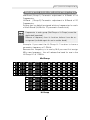
Information Code Table
When "INFO
" flashes on the indicator
Nos.2~7 are displayed.
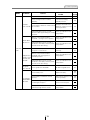
Information Contents
Explanation and remedial action to take
2 NO DISC LOADED IN
THE MAGAZINE
There is no disc in the magazine or player. Load
a disc in the magazine. (Load a music disc.)
3 DISCS ARE DIRTY OR
DAMAGED
The loaded disc is dirty or upside down. Check
it for proper orientation and verify it is clean.
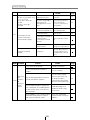
5 CD PLAYER AND CD
CHANGER FAILS
MECHANICALLY
•The CD player and CD changer is inoperative for
some reason. Go through the magazine removal
procedure.
•If a magazine fails to eject, have your dealer fix
the problem.
6 WHEN THE CD CHANGER
INTERNAL TEMPERATURE IS
HIGH (TO PROTECT PICKUP
UNIT)
•The temperature in the CD changer is too high for
operation. Wait till it cools down.
•Resume playing after the “High temperature sensed
and CD stopped" display disappears. If the CD still
cannot play, have your dealer repair it.
7 AN INTERNAL POWER
SUPPLY FAILURE IS
OCCURRING WITH THE
AUTO CHANGER
•Turn the ACC off once before turning it on once
again to resume the operation.
•If the function still cannot be restricted, contact your
dealer.
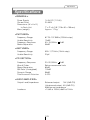
Information Contents
LOAD
Explanation and remedial action to take
CD changer is in the process of verifying the
presence of CDs after a magazine has been inserted
into the CD changer.
118