1
DeCrane Aerospace Audio International
3.8
MCD-9101-102-x/CDEL1018-1
Installation & Operation Manual
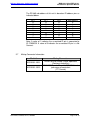
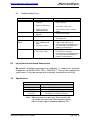
Pinout Assignment and Descriptions
Pin #
1
2
3
4
5
6
7
8
9
10
11
12
13
14
15
16
17
18
19
20
21
22
23
24
25
Description
+ 28 VDC
Circuit and Chassis Ground
RS-485 Serial Data Bus A (HI)
RS-485 Serial Data Bus B (LO)
RS-485 Serial Data Bus Shield
ID Common
ID 0
ID 1
ID 2
NC – No Connection
Analog Audio Output L+
Analog Audio Output LAnalog Audio Output R+
Pause Input
Infrared Digital Input
AES3 Audio Output #1 +
AES3 Audio Output #1 AES3 Audio Output #1 Shield
AES3 Audio Output #2 +
AES3 Audio Output #2 AES3 Audio Output #2 Shield
AES3 Audio Output #3 +
AES3 Audio Output #3 AES3 Audio Output #3 Shield
Analog Audio Output R- *
* Note: Analog audio output (volume) adjustable via front panel controls.
Review Section 4.7 for volume operating instructions.
3.9
Post Installation Test
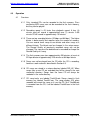
3.9.1 Verify +28 VDC power has been connected to the unit. The audio
signal output of the unit is generally connected to cabin speaker
systems in addition to headphone locations. Verify all connections
before supplying power to the unit.
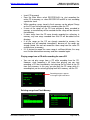
3.9.2 Load the MCD-9101-102-x/CDEL1018-1 with a CD. Use the front
panel controls or the handheld remote control unit to select PLAY.
Verify audio can be heard through the speaker/headphone system.
Document # 540368, Rev B, 10/2009
Page 13 of 29