1
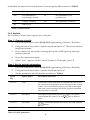
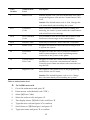
In addition the menu shows the detectors status using the abbreviations in Table 5.
Item
Description…
Item
Description…
OK
The transmitter is
functioning correctly
OS
The transmitter is not
synchronized
TA
Tamper condition
NA
The transmitter is inactive
BT
Battery low
Table 5: Abbreviations
3.4.2. Keyfobs
The CommPact Control System supports up to 19 keyfobs.
Step 1: Register a keyfob
1.
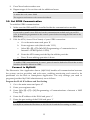
Go to the main menu, select [9]>[1]>[2] (Programming > Devices > Keyfobs)
2.
Using the arrow keys select a specific keyfob and press '√'. The system initiates
Registration mode.
3.
Press a button on the keyfob, assuring the keyfob’s LED lights up when the
button is pressed.
4.
Press the same button again.
5.
When 'Save?' appears on the Control System’s LCD display, press '√'.
Step 2: Set the keyfob's parameters
1.
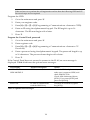
Go to the main menu, select [9]>[1]>[2] (Programming > Devices > Keyfobs)
2.
Using the arrow keys select a specific keyfob and press '√'.
3.
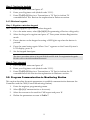
Set the parameters for each keyfob according to Table 6.
Quick
Key
Option Name
Description and Notes
9>1>2>2
Type
Controlled or non-controlled. A controlled keyfob causes
the system to send set/unset event messages to the central
station. Non-controlled keyfobs never send set messages
and send a unset message only if the system is disarmed
after an alarm occurrence
9>1>2>3
Descriptor
Descriptors help identify the device when you operate
key to insert a
and program the system. Use the /
space
9>1>2>4
KF1 PGM
Defines whether the keyfob can control the PGM with the
/
button.
9>1>2>5
Delete
Delete a keyfob
Table 6: Keyfob parameters
8