1
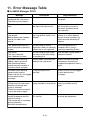
11. Error Message Table
k fx-9860G Manager PLUS
Message
Description
Required Action
An error occurred while
reading the file <file name>.
The file may be corrupted.
Wrong file format.
Check the file to see if it is
corrupted.
There is no more playable
data.
There are no playable keys to
the right of the input cursor.
Move the input cursor to the
left of the keys you want to
play back, and perform the
play operation.
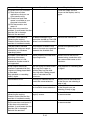
You cannot delete all KeyLog records.
Before deleting the selected
record, first add a new
record.
You are trying to delete all
Key-Log records, which is not
allowed.
To delete all of the current
records, first add a different
record. At least one Key-Log
record must be remaining in
memory.
This application cannot run
on this computer’s operating
system.
You are trying to run the
application under an operating
system that is not supported.
Run the application on a
computer that is using a
supported operating system.
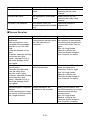
<file name>
This file is read-only.
Use a different file name.
You are trying to save a readonly Key-Log file after editing
or recording to it.
Save the Key-Log file under a
different file name.
A problem occurred while
adding a Key-Log record.
After confirming there is
enough memory capacity to
store the record, try again.
Some problem occurred while
adding a Key-Log record.
Make sure there is enough
free memory remaining to
complete the operation and try
again.
A problem occurred while
A registry access error
accessing the registry.
occurred.
Make sure that you are logged
on with administrator
privileges.
Make sure that you are logged
on with administrator
privileges.
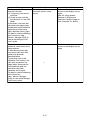
A problem occurred while
writing to the file <file name>
because not enough disk
space is available.
Check the remaining capacity
of your disk and try again.
There is not enough disk
Make sure there is enough free
space available to save the file. memory available and try
again.
This application cannot be
started up because the DLL
version is wrong.
This may be due to a problem
during installation.
Re-install the application.
Your computer has the wrong
DLL version.
E-43
Installation may have failed, so
re-install the application.