1
Reference
English
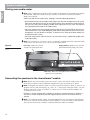
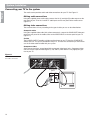
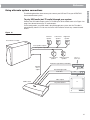
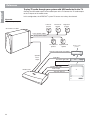
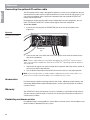
To play TV audio through your system with VCR audio fed to the TV
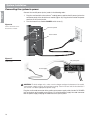
Connect the VCR audio outputs to the audio inputs of the TV. Connect the TV audio outputs
to the TV inputs on the media center.
In this configuration, the LIFESTYLE® system TV source must always be selected.
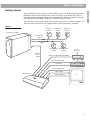
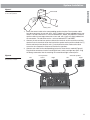
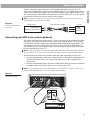
Figure 20
Diagram of a typical system
Left front
speaker
Center front
speaker
Right front
speaker
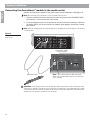
Acoustimass® module
Front speaker outputs
Rear speaker outputs
Left surround
speaker
Right surround
speaker
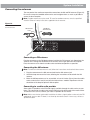
AUX left & right audio (if available)
Speaker
zone 1
output
Input from cable
provider
Cable/satellite box
VCR video
VCR left & right audio
VCR
TV left & right audio
Video output
Media center
TV power detector
™
22
TV