1
Parts Replacement Procedures
Front Bezel and Left Side Panel
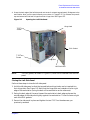
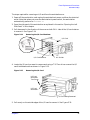
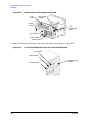
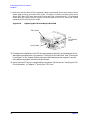
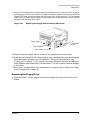
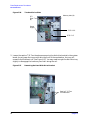
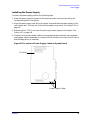
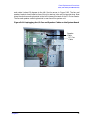
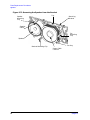
4. Grasp the back edge of the left side panel and rotate it outward approximately 30 degrees to the
workstation. Next, pull the panel toward you as shown in Figure 2-2. This releases the panel’s
top and bottom left side hook hinges from their hinge slots. See Figure 2-2.
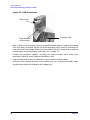
Figure 2-2
Opening the Left Side Panel
Hinge Hook
T-15 Torx
Screw
EMI Gasket
T-15 Torx
Screw
Hinge Slot
Left Side Panel
NOTE
The EMI gasket, as shown in Figure 2-2, must not be removed from the side
panel.
Closing the Left Side Panel
Perform these steps to close the left side panel.
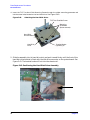
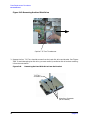
1. Hold the left side panel so that the top and bottom hinge hooks can be inserted into
their hinge slots. See Figure 2-2. Note that the hinge slots are located on the far right
edge of the workstation (using the back of the workstation as the reference).
2. Swing the back edge of the panel toward the workstation’s back edge and press the
outside edges of the side panel tightly against the workstation. This will ensure a tight
seal of the EMI gaskets.
3. Secure the side panel in place and tighten the two T-15 Torx thumbscrews you
previously removed.
Chapter 2
17