1
Camera Operation
Notes
• If AGC is OFF, you can´t select AUTO mode.
• When an infrared light is used, there may be a problem with focusing and COLOR (DAY &
NIGHT).
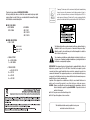
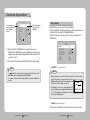
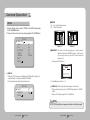
SYNC : Two SYNCHRONIZATION modes are available INTERNAL and EXTERNAL
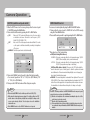
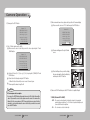
- OFF : MOTION DETECTION mode is cancelled.
- ON : Any motion in the selected areas is observed.
• Please select the area you wish to observe from the
4 areas in AREA SEL mode.
• Please select ON mode for the chosen area.
• Please adjust the size of the area to be observed by
using the UP, DOWN, LEFT or RIGHT button.
• P lease press the SETUP button to save the changes
and complete the setting.
LINE-LOCK. In LINE-LOCK mode, it synchronizes the video signal between
cameras without a synchronous generator. The line-lock synchronization is only
used in the areas of 60Hz(NTSC Model) / 50Hz(PAL Model)
- INT : Internal synchronization - LL : External line-lock synchronization
Notes
• There is no 'MD' output signal. 'MD' is on screen display only words.
• If you choose 'LL', you can adjust the desired phase.
Press the SET button.
• You can adjust the desired phase from 0 to 359.
Notes
• When the power frequency is 50Hz, you can not use line-lock mode (NTSC MODEL).
• When the power frequency is 60Hz, you can not use the line-lock mode (PAL MODEL).
• 'Sync' mode is fixed to 'INT' in DC12V input power.
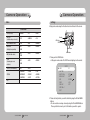
MOTION DETECTION:
This product has a feature that allows you to observe movements of objects in 4
different areas on the screen, and the words 'MOTION DETECTED' appear on the
screen when movement is detected; hence a single individual can conduct
supervision efficiently. The camera detects an object's movement by sensing
disparity of outline, and level of brightness and color.
• Please press the SETUP button.
COLOR CCD CAMERA
34 User’s Manual
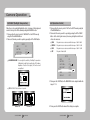
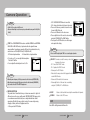
PRIVACY : T his modes conceals the areas you do not wish
to appear on the screen.
- OFF: Cancels the PRIVACY mode.
- ON : Operates the PRIVACY mode.
• Please press the SETUP button.
• Please select the area you do not wish to appear from the 4
areas in AREA SEL mode.
• Please select ON mode for the chosen area.
• Please adjust the size of the area to be concealed by
using the UP, DOWN, LEFT or RIGHT button.
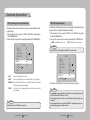
RESET : Returns to the level which was set by the manufacturer for shipment.
RETURN : Returns to the SETUP menu.
EXIT
Saves all the setting menus and then exits.
COLOR CCD CAMERA
35 User’s Manual