1
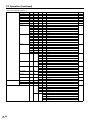
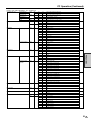
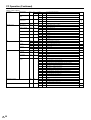
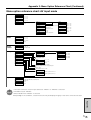
Appendix 3: Menu Option Reference Chart (Continued)
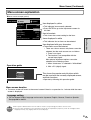
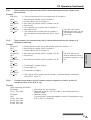
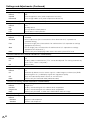
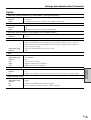
Menu option reference chart: AV input mode
Picture
Contrast
0 - 40
Black Level
–30 - 0 - +30
Color
–30 - 0 - +30
Tint
–30 - 0 - +30
Sharpness
–10 - 0 - +10
Advanced
Reset
Audio
Yes, No
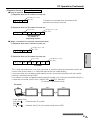
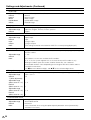
C.M.S. (H)
C.M.S.
C.M.S. (S)
R
–30 - 0 - +30
C.M.S. (V)
Y
–30 - 0 - +30
Color Temp
High, Mid-High, Mid, Mid-Low, Low
G
–30 - 0 - +30
Black
Off, High, Low
C
–30 - 0 - +30
3D-Y/C
Standard, Fast, Slow
B
–30 - 0 - +30
Monochrome
On, Off
M
–30 - 0 - +30
Film Mode
On, Off
Reset
Yes, No
I/P Setting
Interlace, Progressive
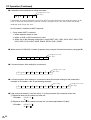
Treble
–15 - 0 - +15
Bass
–15 - 0 - +15
Balance
L 30 - 0 - R 30
Reset
Yes, No
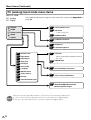
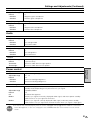
Power
control
Brightness
–8 - STD - +8
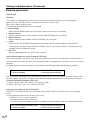
Setup
Control Lock
Lock Item
Menu Display
Lock, Unlock
Input Select *1
PIN
Input 4 digit numbers
Remote
Lock, Unlock
Position
PIN Clear
Yes, No
Buttons
Lock, Unlock
Power
Lock, Unlock
RS-232C
Lock, Unlock
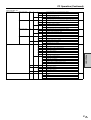
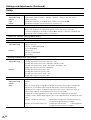
Power Management Off, Mode1, Mode2
Picture Flip
AV, Y/C
Language
COMPONENT, RGB *2
INPUT2 Select *3
ID No. Setting
Enlarge
Panel Protection Cover
H-Pos.
–10 - 0 - +10
V-Pos.
–20 - 0 - +20
Reset
Yes, No
Normal, Mirror, Upside Down, Rotate
Japanese, English, Deutsch, Français, Español
Input, Output
Input numbers from 000 to 255
Off
2×2
Select the position from 1 to 4
3×3
Select the position from 1 to 9
Attached, Detached
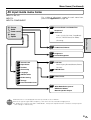
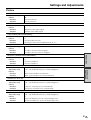
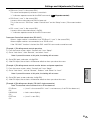
Option
Wide Mode
Normal, Full 14:9, Zoom 14:9, Panorama, Cinema 14:9, Cinema 16:9, Full, Underscan
Color System
Auto, PAL, SECAM, NTSC3.58, NTSC4.43
DNR
Off, High, Low
Quick Shoot
On, Off
Monitor Speaker Output On, Off
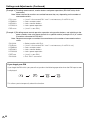
*1 This item cannot be chosen if input other than “INPUT1” or “INPUT3” is selected.
NOTE: *2 Available only for “INPUT3”
*3 Not available when “INPUT2” is selected.
» Depending on the conditions, certain menu items may be displayed in gray. These items cannot be selected.
Appendix
71
US