1
Troubleshooting
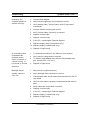
DVD video movie will
not play
Poor performance of
DVD video disc (poor
sound or picture)
Symptom Charts / Infrared Communication -
1.
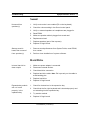
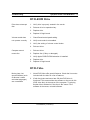
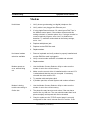
Clean the disc with an appropriate cleaner.
2.
Try another DVD video disc.
3.
Ensure DVD video disc appears on desktop.
4.
Check that Parental Controls setting is set to On. Select an
MPAA rating at the same level or higher than the title being
viewed.
5.
Check region code for DVD video title. (Warning message
appears.)
6.
Reinstall software.
1.
Check the DVD video disc for scratches.
2.
Disable background applications.
3.
Turn off AppleTalk and TCP/IP.
4.
Set display to millions of colors.
5.
Set Disk Cache to default setting in Memory control panel.
6.
Use Extensions Manager to disable extensions except for the
standard Apple extensions and DVD extensions. Restart the
computer.
7.
For an audio problem, try playing an audio CD. If problem
persists, refer to the Sound symptom chart in this chapter.
Infrared Communication
Infrared
communication is not
working
1.
Clean infrared window with soft lint-free cloth.
2.
Make sure units are spaced 3-6 feet apart and at less than a
20 degree angle.
3.
Verify infrared signal is being received by host computer.
4.
Replace I/O logic board.
PowerBook (FireWire)