1
Model GXT900/950 Series
®
USING THE RADIO IN STANDARD MODE
You can set your GXT900/950 Series to Standard Mode to communicate with radios which do not have the Group Mode feature.
SETTING THE RADIO TO STANDARD MODE
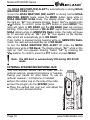
To turn the STANDARD MODE on, press the MENU button until the
display shows “Gr” blinking, while an “on” appears on the right of the
display. Select “of” by pressing the / buttons and press the PTT
button to confrim or press MENU button again to move to the next
feature setting.
When the radio is in STANDARD MODE the Group Mode icon will
disappear on the display.
SETTING PRIVACY CODES
When the GROUP Mode is turned off, you can use the normal Privacy
Codes which is common to other radios which are not set to Group
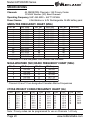
Mode. Your GXT900/950 Series has 142 Privacy Codes available
which can only be used on channels 1~22. The selected Privacy
Code may be different for each channel. To select a Privacy Code for
the current channel press the MENU button twice, and then the /
buttons to select between “Off/CTCSS/ DCS”. Press again the MENU
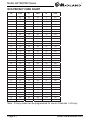
button and the / button to select one of the 38 CTCSS Codes or
one of the 104 DCS Codes.
The Privacy Code icon on the display will indicate whether you set
your Privacy Code in CTCSS or DCS mode. To confirm the selection,
press the PTT button or press MENU button again to move to the next
feature setting.
Note : If you select any CTCSS Privacy Code, any pre-selected
DCS Privacy Code will be cancelled and vice-versa.
Selecting a Privacy Code of "oF" will disable the Privacy
feature. To communicate between two GXT900/950
Series radios, all radios in your group must be set to the
same channel and Privacy Code selections. The Privacy
Code can only be set in channels 1~22.
!
Page 14
www.midlandradio.com