1
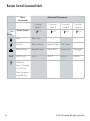
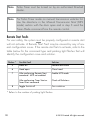
Remote Control
Feature
Description
Internal Antenna
Used for transmitting information
Transmit LED
Active when transmitting information
Command buttons (4)
Used to perform locking, unlocking, auxiliary channel and
remote start commands
AUX
Function button
Used to access function levels for commands, configuration
menus for programming and Car Selection
Control Center
LED
Control Center
Button
The Control Center, typically located on the upper part of the front
windshield. It consists of:
•
•
•
The In-vehicle system antenna.
The Status LED, as a visual indicator of the system’s status.
The Control button, for placing the system into Valet Mode* and
to perform the Emergency Override operation.
* See “Remote and System Operations” for details.
4
© 2013 Directed. All rights reserved.