1
DP-100+ Multiprotocol Ethernet Print Server User’s Guide
Port Connectors
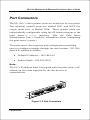
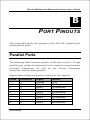
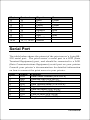
The DP-100+’s three printer ports are located on its rear panel.
Two identical parallel ports are labeled LPT1 and LPT2; the
single serial port is labeled COM. These printer ports are
independently configurable using the PS Admin program or the
print server’s telnet interface. (See the Print Server
Administration User’s Guide for information about configuring
the print server’s ports.)
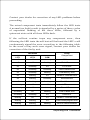
The print server also supports web configuration permitting
users to configure settings through the web browser. DP-100+
default IP address as follows:
♦
Default IP address – 192.168.0.10
♦
Subnet Mask – 255.255.255.0
Note:The PC’s IP address must correspond with the print server’s IP
address in the same segment for the two devices to
communicate.
Figure 2 -2 Port Connectors
Introduction