1
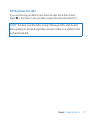
Making Sure Your iMac Recognizes the New Memory After installing memory, make sure your iMac recognizes the new memory. To check the memory installed in your iMac: 1 Start up your iMac. 2 When you see the Mac OS X desktop, choose Apple () > About This Mac. You’ll see the total amount of memory installed in your iMac. For a detailed view of the amount of memory installed, open System Information by clicking More Info and then click Memory. If the memory you installed doesn’t meet specifications (see page 32), your iMac will sound three tones every five seconds. If this happens, shut down your iMac and check the installation instructions again to make sure that the memory is compatible with your iMac and that it’s installed correctly. If you still have problems, remove the memory and consult the support information that came with the memory or contact the vendor who provided the memory. 38 Chapter 3 Boost Your Memory