1
Index
spare part number 3–5,
3–17, 3–20, 5–17
specifications 6–8
DVD±RW and CD-RW
Double Layer Combo Drive
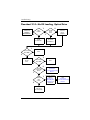
OS loading problems 2–22
precautions 4–3
removal 5–17
spare part number 3–5,
3–17, 3–20, 5–17
specifications 6–9, 6–10
E
electrostatic discharge 4–4,
4–8
expansion port 2 1–11
expansion port 2 bracket
removal 5–67
spare part number 3–5,
3–25
ExpressCard assembly
removal 5–50
spare part number 3–7,
3–22
ExpressCard slot 1–9
ExpressCard slot bezel
illustrated 3–14
removal 5–48
external monitor port
location 1–10
pin assignments A–3
F
fan/heat sink assembly
removal 5–64
spare part number 3–5,
3–25, 5–64
features 1–2
feet
illustrated 3–14
locations 5–9
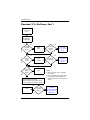
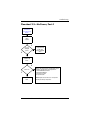
flowcharts, troubleshooting
no audio 2–23, 2–24
no network/modem
connection 2–28
no OS loading 2–17
no OS loading from
diskette drive 2–21
no OS loading from hard
drive 2–18, 2–19, 2–20
no OS loading from optical
drive 2–22
no power 2–10, 2–12, 2–13
no video 2–14, 2–15
nonfunctioning device
2–25
nonfunctioning docking
device 2–16
nonfunctioning keyboard
2–26
nonfunctioning pointing
device 2–27
fn key 1–15
front components 1–6
f1 to f12 keys 1–15
fan assembly, spare part
number 3–26
Maintenance and Service Guide
Index–3