1
Silver Stream-In / Stream-Out - User Manual SR 1.0.4 – 10/2012
4.4.5.5 Advanced Configuration
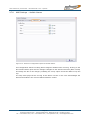
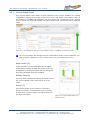
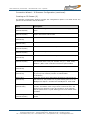
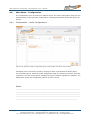
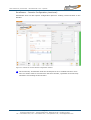
The “Advanced” configuration page can be opened directly from the Connection Page, or after the Configuration Wizard procedure was completed.
Figure 4-17: Shows the Advanced configuration window
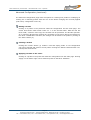
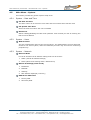
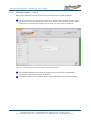
The Connection Wizard as described earlier has created the “New Profile” from the audio settings and the IP stream configurations. The “New Profile” now appears in the list of profiles
on the left hand side (Connections). This list of profiles is also accessible with the “Quick
Connection” tool. A click on the little arrow opens or closes the profile list.
Page 60
Whiterock Business Park - 729 Springfield Road - Belfast BT12 7FP - Northern Ireland
Tel.: +44 28 9067 7200 | Fax: +44 28 9067 7201 | www.aptcodecs.com | contact@aptcodecs.com