1
Video Connections
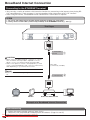
Connecting to the HDMI Terminal
• You can enjoy high quality digital picture and sound through the HDMI terminal.
• See page 44 for information on the output of next generation audio formats.
• When you use AQUOS LINK, make sure to use a certified HDMI cable.
STEPS
1 Be sure to turn off this Player and the equipment before making any connections.
2 Firmly connect an HDMI cable (commercially available) to the HDMI terminals (1 and 2).
This Player
NOTE
• Audio transmitted in DTS-HD High
Resolution Audio and DTS-HD Master
Audio formats is output from the
HDMI terminal as Bitstream. Connect
an amplifier with a built-in decoder to
enjoy the fine sound quality.
• When using an HDMI output, 7.1 ch
Digital Output is available.
1
Selecting the priority video output when
connecting HDMI and Component video
When you connect both an HDMI cable and a
component cable to this player, you need to select
the priority video output in “Settings” – “Audio Video
Settings” – “Video Out Select”. (See page 36.)
To HDMI OUT terminal
NOTE
• When you connect the player to a SHARP TV with an
HDMI cable only and the TV is turned on, the video output
switches to HDMI automatically. (The above setting is
unnecessary.)
• When you connect the player to a TV with an HDMI cable,
“HDMI Video Out” is set to “Auto”. If you don’t get a stable
image, select the desired resolution*.
When you set “HDMI Video Out” to a setting other than
“Auto”, you can only select resolutions* that are compatible
with the connected TV.
* Refer to “HDMI Video Out” on page 36 regarding the
resolutions of the HDMI video output.
HDMI cable
(commercially available)
2
To HDMI IN terminal
Projector
TV
AV receiver
Equipment with an HDMI terminal
After connecting
•
•
•
•
Secure the HDMI cable to the HDMI cable holder, passing it through the holder. (Page 11)
If desired, connect audio equipment. (Page 17)
Load a disc and start playback. (Pages 23–28)
Refer to AQUOS LINK function. (Pages 22 and 37)
Downloaded From Disc-Player.com Sharp Manuals
14