1
DF3215
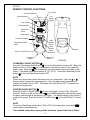
REMOTE CONTROL FUNCTIONS
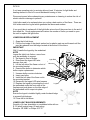
Room temperature
Set temperature
Time of day
Low
Battery
Indicator
Day of week
Remote display
Up direction
button
Enter button
Left direction button
Flame/Heat ON/OFF
button
Right
direction
button
Down
direction
button
Purifire™ ON/OFF button
Occupancy
Sensor
Batteries
Sleep timer
Ambient Light
Sensor
FIGURE 5
FLAME/HEAT ON/OFF BUTTON
Press the Flame/Heat On/Off button
to turn the Flame/Heat function ON. When the
heater function is ON, the icon is displayed on the remote control in the upper left
hand corner. When this icon is displayed, the red indicator light is activated on the
firebox. The default temperature setting is 72°F (22°C). Press the Flame/Heat On/Off
button
to turn the Flame/Heat function OFF.
NOTE
When using the remote control the heater runs on a thermostat. Press the or
direction keys to adjust the set temperature. Once the desired set temperature is
reached the heater will turn OFF. The heater will cycle ON and OFF to maintain the
desired set temperature.
PURIFIRE ON/OFF BUTTON
Press the Purifire™ On/Off button
to turn the Purifire™ function ON. When the
Purifire™ function is ON and the Heater icon is NOT displayed on the remote control,
the green indicator light is activated on the firebox. The default setting for the Purifire™
is set at low speed. Press the Purifire™ On/Off button
to turn the Purifire™ function
OFF.
NOTE
To turn the Flame/Heat and Purifire™ ON or OFF at the same time, press both
control buttons simultaneously.
*For detailed instructions on any of the functions, consult the User’s Guide*
4