1
Select A Tuner Reference
The HardWire Tuner has multiple tuning references to select from: A=A 440
(standard tuning), A=A flat (tuned half step down), A=G (tuned whole step
down), and alternate tuning references (A=A 437 - A=A 443).
To select the tuner reference, do the following:
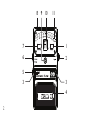
1. Press the Foot Switch to turn on the tuner. A dash appears in the note
display.
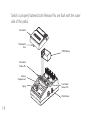
2. Press the TUNING button. A t appears in the note display and the
LED above the current tuning reference lights. Press the TUNING
button to select the next tuning reference. The reference is a 1/2 step
down (A=A flat) if the LED above b is lit. The reference is a whole step
down (A=G) if the LED above bb is lit.
3. Once the selected tuning reference LED is lit, wait 3 seconds and the
pedal returns to normal operation. The last tuning reference selected is
automatically saved.