1
CONNECTION OF YOUR DVD PLAYER WITH TV
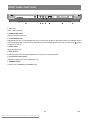
Be sure to turn off the power of each component before making the connections.
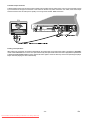
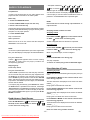
Scart socket:
RGB signal via SCART cable gives you the best picture performance. If your DVD player will not be connected to a hifi set or A/V amplifier to hear better sound, scart is enough for both audio & video connections.
79
6&$57
6&$57
6FDUW&DEOHFRPPHUFLDOO\DYDLODEOH
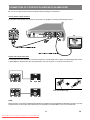
Video & Audio Output sockets:
Video (yellow) & audio (Red: right, White: left) output sockets can be used to connect the DVD player to your TV set via
cables. To make this connection, your TV set must have Video & audio input connectors. This type of connection is
alternative to scart connection. Picture quality is not as good as SCART RGB connection but audio performance is the
same.
79
9LGHR2XWSXW
/HIW5LJKW
2XWSXW
$XGLR9LGHR&DEOHFRPPHUFLDOO\DYDLODEOH
- 13 Downloaded From DvDPlayer-Manual.com Sharp Manuals
EN