1
Networking and Communications
HandReader networking and communications can be configured in one of five ways:
• as a stand-alone HandReader
• as a master or remote HandReader in a HandReader network
• as a remote HandReader in a HandReader network connected to a host PC
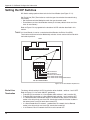
• as a remote network connected via optional Modem to host PC
• as a remote network connected via optional Ethernet to host PC
Stand-alone
HandReader
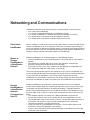
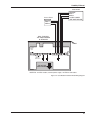
When installed as a stand-alone access control system there is no communication wiring
to other HandReaders or to a host computer. Power input and control output wiring are
all that are required. An RS-232 serial printer output is available for event logging (refer to
the Printer section on page 16). Schlage Biometrics highly recommends using Backhand™
software to backup template information stored in the HandReader.
Master or
Remote
HandReader in
a HandReader
Network
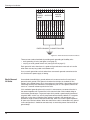
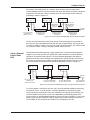
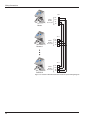
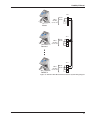
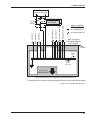
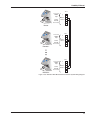
Multiple HandReaders can be linked together in a HandReader network.
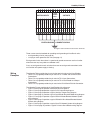
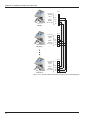
• Up to 32 HandReaders can be linked together on a 2-wire RS-485 or 4-wire RS-422
network.
• Two twisted-pair, shielded, AWG 22 (or larger) wire should be used (Schlage
Biometrics recommends Belden 82732 or its equivalent).
• The wiring must be a “daisy chain” network from HandReader to HandReader and
must not exceed 4,000 feet (1220 meters) in total length.
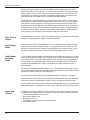
The master/remote network requires user enrollment at the “master” HandReader. The
master HandReader distributes hand template data with ID numbers and time restrictions
(if any) to the other HandReaders in the network. Users removed at the master
HandReader are automatically removed from the remote readers. A printer connected to
the master HandReader will report transactions from all HandReaders on the network.
Remote
HandReader in
a HandReader
Network
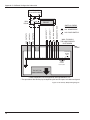
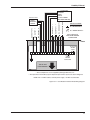
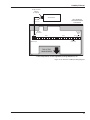
Connected to a
Host PC
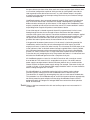
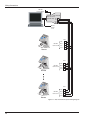
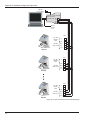
Multiple HandReaders can be linked to a personal computer (PC) for an integrated
access control network. Real time monitoring of door status and a variety of alarm types
can be done with Schlage Biometrics’ HandNet for Windows™ (Schlage Biometrics
model number HN-300) software. To run HandNet for Windows™ the computer must be
PC compatible, using a Pentium™-166 or faster microprocessor and it must have a CDROM.
• The HandNet software can monitor over 1,000 HandReaders simultaneously.
• An unlimited number of sites can be created with up to 32 HandReaders per site.
• The HandReaders report all transactions to the PC. The HandNet software records all
transactions and displays a variety of reports generated from this information.
• Template management is handled automatically.
• Users may enroll at any HandReader in the system. The PC collects the data and
distributes it to other HandReaders in the network.
• Access may be restricted by time and by HandReader via HandNet’s access profiles
and by the use of time zones.
15