1
2. Recording
❏ Realtime Recording (Replace,
Overdub)
The PATTERN mode offers two realtime phrase recording
methods: REPLACE and OVERDUB.
You use the REPLACE method when you want to create a
entirely new phrase or overwrite an existing phrase. This
method erases any data already existing in the selected phrase.
n
• You can use pattern job 00 (Undo/Redo) to cancel a recording that you have just made. This allows you to recover data that you have inadvertently over-recorded. (page
82)
• Remember to set other appropriate parameters (such as
BPM, click beat, click mode, and recording count; see page
133) before beginning the recording.
• If you want true recording of velocity values, enter the
data from a remote MIDI keyboard.
You use OVERDUB when you want to overdub new data onto
the phrase’s existing data. This allows you to build up a complex, multilayered phrases.
1 After completing the “Preparing to Record” procedure
described above, select the track to record via the
RM1x keyboard as described on page 27.
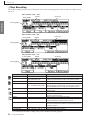
2 Set the BPM to the value you want to record at.
It’s sometimes easier to set a slow tempo for realtime
recording, so you have plenty of time to enter the
data.
3 Press the PLAY p button to begin recording. The
metronome will sound and you’ll be given a onemeasure count-in prior to the first measure actually
recorded. The count-in is also indicated by negative
numbers in the “MEAS” parameter.
Play the required part either on the RM1x keyboard
or via an external MIDI keyboard.
4 Press the STOP s button when you’re ready to stop
recording. The normal PATTERN play mode is automatically re-selected when you stop recording, and
you’ll automatically be returned to the top (first measure) of the pattern.
5 Repeat steps 1 through 4 to record other tracks, as
required.
If you input an incorrect note, you can remove it on a
subsequent round by holding down the [SHIFT] button together with the same note key - hold both of
these keys down as the recording passes the point
where the original (bad) note was entered.
RM1x SEQUENCE REMIXER
51
PATTERN MODE
You use this recording method when you want to input your
phrase in real time. You can input the phrase directly either at
the microkeybaord, or else through a remote MIDI keyboard
or other such MIDI device. Or you can record (copy) a phrase
from a computer or from another sequencer.