1
Connecting the camera to your computer
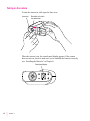
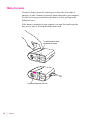
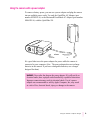
Use only the serial cable that came with your camera.
1
Turn off the camera (shut the lens cover).
2
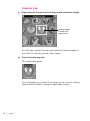
Plug one end of the serial cable into any functional serial port that’s available on your
computer.
When you choose a port for the camera, you must verify that the port is
working. Several factors can interfere with the functioning of a serial port.
For example, you may have installed a modem card that disables one of your
serial ports. Also, changes to the settings in the Advanced Settings dialog
box (available through the Windows Ports control panel) may prevent
communication with a serial port. (The default settings work.)
It is not necessary to configure the serial port for the camera (baud rate, data
bits, parity, stop bits, and flow control). The QuickTake Serial Port software
automatically provides the appropriate communications settings and doesn’t
use the Windows Ports settings.
If you have a 25-pin serial port, purchase a 9-to-25-pin adapter at your local
computer reseller.
IMPORTANT It is not necessary to turn off your computer before you connect
and disconnect the serial cable. (As long as a serial port is free, it’s not active.)
However, if you want to connect or disconnect other devices, you should
check the appropriate manuals first. In many cases you must turn off the
computer before you connect or disconnect a cable.
22
Chapter 3