1
630288_0_Manual_Installation-Service_ST900_AUS NZ
19.0
Operating Instructions:
The escea ST900 remote control allows you to turn ON and OFF the fire, control the flame
height in the Manual mode, or control the room temperature in the Thermostat mode. The
remote has a maximum range of approximately 10 meters, and because the remote works
by radio frequency, it does not need to be aimed at the ST900 for it to operate. The remote
control runs off 2x AA batteries which are supplied in the same packaging as the remote.
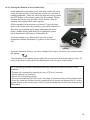
The remote control is supplied with a wall-mount cradle; the installer should mount this at a
location determined by the customer.
19.3
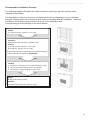
Switching on the ST900:
Note: If this is the first time running the ST900 the air will need to be purged from the gas
lines. To do this, follow the instructions below to switch the fire on and then switch it
off. Repeat this up to 10 times until the pilot flame successfully sparks and ignites.
BLOCKED error will occur after 5 ignitions within a 15 min period. This requires the
control unit’s power supply to be turned off for 15 seconds or you can wait out 15
minutes.
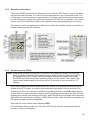
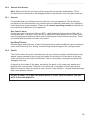
When first powered the remote starts at the OFF screen (it is possible that the remote is
locked in the OFF screen: to unlock it just press the button below Unlock, and then OK).
Switching on: Once the remote is unlocked, press On (left button) and OK (middle button).
A beep from the control unit will be heard, and the ignition process starts (the pilot will start
sparking and gas will start flowing to the pilot, which should then be lit within a few seconds,
after which the main burner will ignite in HIGH flame mode). Note that while in operation the
RF signal strength indicator disappears.
Wait until the current flame status displays HIGH.
If the pilot flame fails to ignite, you must turn OFF the fire from the remote and start the
process of turning it ON again.
30