1
NORMAL OPERATION
FIRST USE
Factory default setpoints:
- cook: 325ºF
- hold: 200ºF
- timer: 1 hour
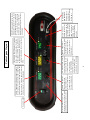
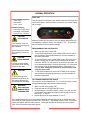
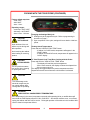
Turn the cabinet on using the power switch located on the far left side
of the control panel. Once the switch is turned on, the control display
will illuminate.
Operating ranges:
- cook temp: 100ºF-325ºF
- hold temp: 100ºF-200ºF
- timer:10 min. -18 hours
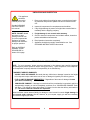
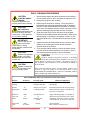
CAUTION:
HOT SURFACE
Inner surfaces of the unit
will be very hot during and
after operation.
Avoid touching the cabinet
when loading or removing
product.
CAUTION:
STEAM HAZARD
This unit produces steam,
use caution when cleaning
or opening the doors.
CAUTION:
To avoid damage to the
electrical components, do
not unplug cabinet while
cooling fans are operating.
WARNING:
HIGH CONTROL
COMPARTMENT
TEMPERATURE
When the cabinet is first turned on, the time display will show the current hardware / software revision, for example “F107”. Then the display will display the factory default settings.
PROGRAMMING THE CONTROLLER
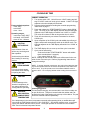
1. Make sure the unit is turned “ON”.
2. To set COOK temperature, push “COOK TEMP” knob in and rotate clockwise to increase temperature or counter-clockwise to
decrease temperature.
3. To set COOK time, push “COOK TIME” knob in and rotate clockwise to increase time or rotate counter-clockwise to decrease
cook time. NOTE: For cook times of 10 minutes to two hours, timer will increase/decrease in 5 minute increments. For cook times
over 2 hours, timer will increase/decrease in increments of 15
minutes. Note: setting the cook time is only necessary if not
using the meat probe.
4. To set HOLD temperature, push “HOLD TEMP” knob in and rotate clockwise to increase temperature or counter-clockwise to
decrease temperature.
TO CHANGE TEMPERATURE SCALE
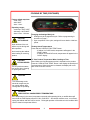
The controller can be changed from °F to °C and vice versa. In order
to toggle between the Fahrenheit and Celsius scales:
1. Make sure the unit is turned “OFF”
2. Push and hold the “START/CANCEL” button
3. While pushing the “START/CANCEL” button, turn “ON” the main
power switch. An audible beep will be heard and the center display “deg F” or “deg C”
4. Repeat procedure to toggle between °F and °C
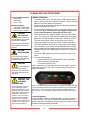
If the temperature in the control compartment exceeds safe operating limits, an audible alarm will
sound and the TIME display will scroll “CALL CUSt SErV”. Should this condition occur, turn off and
unplug the cabinet and then call for service. Prolonged operation of the cabinet in this condition
WILL result in electrical component failures.
7