1
TWO TIME / TWO TEMPERATURE CYCLES
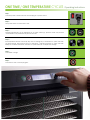
Step 1
Connect power cord into back of unit and plug in to power source.
Operating Instructions
RESET
Step 2
Turn power switch on from back of unit.
Step 3
Default temperature is set to Fahrenheit (F). To select Celsius (C), press the “Start” key and the
“Time Subtract” key simultaneously for two seconds.
Step 4
To select two time, two temp mode, press the “Stop” key and the “Time Subtract” key simultaneously
for two seconds.
Step 5
Set temperature & time. Press temp key once to change by 1° increments or “press and hold”
for rapid change.
Step 6
Press time key once to change by 1 minute increments or “press and hold” briefly for 15 minute
increments. Continue to “press and hold” for rapid hour change.
Step 7
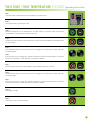
Press the “Stop” key and the “Time Subtract” key simultaneously for two seconds.
Step 8
Set temperature & time. Press temp key once to change by 1° increments or “press and hold”
for rapid change.
Step 9
Press time key once to change by 1 minute increments or “press and hold” briefly for 15 minute
increments. Continue to “press and hold” for rapid hour change.
Step 10
Press START to begin
Step 11
Press STOP to end or cancel program.
7