1
DSL-320T ADSL Modem User Guide
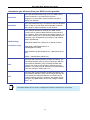
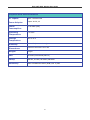
Information you will need about your DSL-320T ADSL Modem:
Username
This is the Username needed access the Modem’s
management interface. When you attempt to connect
to the device through a web browser you will be
prompted to enter this Username. The default
Username for the Modem is admin. The user cannot
change this.
Password
This is the Password you will be prompted to enter
when you access the Modem’s management interface.
The default Password is admin. The user may change
this.
LAN IP addresses for
the DSL-320T
This is the IP address you will enter into the Address
field of your web browser to access the Modem’s
configuration graphical user interface (GUI) using a
web browser. The default IP address is 192.168.1.1.
This may be changed to suit any IP address scheme
the user desires. This address will be the base IP
address used for DHCP service on the LAN when DHCP
is enabled.
LAN Subnet Mask for
the DSL-320T
This is the subnet mask used by the DSL-320T, and will
be used throughout your LAN. The default subnet mask
is 255.255.255.0. This can be changed later.
Record info here
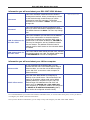
Information you will need about your LAN or computer:
Ethernet NIC
If your computer has an Ethernet NIC, you can
connect the DSL-320T to this Ethernet port using an
Ethernet cable. You can also use the Ethernet ports
on the DSL-320T to connect to other computer or
Ethernet devices.
DHCP Client status
Your DSL-320T ADSL Modem is configured, by
default, to be a DHCP server. This means that it can
assign an IP address, subnet mask, and a default
gateway address to computers on your LAN. The
default range of IP addresses the DSL-320T will
assign are from 192.168.1.2 to 192.168.1.254.
Your computer (or computers) needs to be configured
to Obtain an IP address automatically (that is,
they need to be configured as DHCP clients.)
Record info here
It is recommended that your collect and record this information here, or in some other secure place, in case you have to
re-configure your ADSL connection in the future.
Once you have the above information, you are ready to setup and configure your DSL-320T ADSL Modem.
ix