1
Setting up the heating power
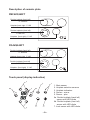
Set the required heating power after you’ve
selected a hotplate with appropriate sensor
(2). As long as digit “0“ is flashing on the
indicator (3), you may set the required heating power with „+” (5) or „-” (4) sensors.
If you do not wish to use the automatic
power reduction system, start setting the
heating power from „+” sensor (5). You may
then increase the heating power with „+”
sensor (5) or reduce it with „-” sensor (4).
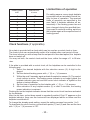
Level of the
heating power
1
2
3
4
5
6
7
8
9
Quick cooking
time (min)
1
3
4,8
6,5
8,5
2,5
3,5
4,5
-
If you wish to use the automatic power reduction system, start setting the heating
power from „-” sensor (4). (See automatic power reduction system).
Automatic power reduction system
Every hotplate is provided with automatic power reduction system. If the system is
activated, the hotplate will be switched on at its full power for a time depending on
the selected heating power level and then the power will decrease to the set heating
power level.
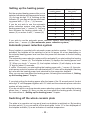
The automatic power reduction system will be activated if you start setting the heating
power from „-” sensor (4). The hotplate indicator (3) displays the heating power level
“9”. When you touch “+” sensor (5), the hotplate indicator (3) will display a dot near
“9” digit for about 10 seconds.
If, within 10 seconds, you start setting the heating power with „-” sensor (4), the automatic power reduction system will be activated and “A” letter will be displayed, flashing
by turns with the heating power level selected for the respective hotplate.
Now, you can any time adjust the heating power, following the instructions of „Setting
up the heating power” chapter.
If you start setting the heating power after the lapse of the 10 second period, the dot
near digit “9“ will disappear together with “A“ letter and the automatic power reduction
system will stay inactive.
If you do not wish to use the automatic power reduction system, start setting the heating
power from „+” sensor (5). Now, you can any time adjust the heating power, following
the instructions of „Setting up the heating power” chapter.
Switching off the whole ceramic plate
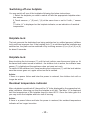
The plate is in operation as long as at least one hotplate is switched on. By touching
the main switch (1) you can switch off the whole plate. Letter “H” is then displayed on
the hotplate indicator (3) as an indication of residual temperature.
- 11 -