1
XL-65H
ENGLISH
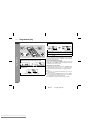
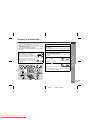
To specify programmed types and select stations (PTY search):
You can search a station by specifying the programme type (news,
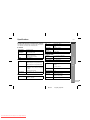
sports, traffic programme, etc. ... see pages 17 - 18) from the stations in memory.
1
2
Press the TUNER (BAND) button to select "FM".
Press the PTY.TI button.
"PTY TI" will flash for about 4 seconds.
3
Within 4 seconds, press the PRESET (
lect the programme type.
or
) button to se-
Each time the button is pressed, the programme type will appear. If the button is held down for more than 0.5 seconds, the
programme type will appear continuously.
4
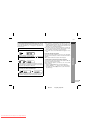
Whilst the selected programme type is flashing (within 4
seconds), press the PTY.TI button again.
Notes:
" If the display has stopped flashing, start again from step 2. If the
unit finds a desired programme type, the corresponding channel
number will flash for about 4 seconds, and then the station name
will flash for 7 seconds and will remain lit.
" If you want to listen to the same programme type of another station, press the PTY.TI button whilst the channel number or station
name is flashing. The unit will look for the next station.
" If no station can be found, "NOT FOUND" will appear for 4 seconds.
If you select the traffic programme:
If you select the traffic programme (TP) in step 3, "TP" will appear.
(This does not mean that you can listen to the traffic information at
that time.)
When a traffic information is broadcast, "TA" will appear.
To specify station names and select stations manually:
You can select a station by specifying the name (BBC R1, BBC R2,
etc.) from the stations stored in memory.
Before starting this operation, you must store one or more station
names in memory.
1 Press the TUNER (BAND) button to select the FM band.
2 Press the PRESET ( or ) button to select a desired station.
3 The station name will be displayed for 3 seconds. Then the display will change.
RDS Radio
! To recall stations in memory
After the selected programme type has been lit for 2 seconds,
"SEARCH" will appear, and the search operation will start.
E-20
02/11/21
Downloaded From Disc-Player.com Sharp Manuals
XL_65H_H_E3.fm
1
2
3
4
5
6
7
8