1
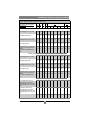
APPENDIX B: AK600 Configuration Settings.
Table B-1: MultiView AK600 Configuration Jumper Settings
Configuration Option (all options
utilize 4th pair):
SW1
JP1
SW2
JP2 JP3 JP4
1
2
3
4
5
1
2
RGBHV Computer Video (see note below on daisy chaining)
With Left/Right Line Level Audio
1-2
1-2
1-2
1-2
OFF
ON
ON
OFF
OFF
OFF
OFF
With SDPIF Digital Audio
1-2
1-2
1-2
1-2
OFF
ON
OFF
OFF
OFF
OFF
ON
With Simplex Serial (receive only)
1-2
1-2
1-2
1-2
ON
OFF
OFF
OFF
OFF
ON
OFF
With Composite Video
1-2
1-2
1-2
1-2
OFF
ON
OFF
OFF
OFF
OFF
ON
With RS 232 serial or SA/SAP series
(requires separate daughterboard
installed)
Also set External TERM switch to
OFF.
2-3
2-3
2-3
2-3
OFF
OFF
OFF
OFF
OFF
OFF
OFF
Composite, S-Video, Component Video (see note below on daisy chaining)
With Left/Right Line Level Audio
1-2
1-2
1-2
1-2
OFF
ON
ON
OFF
OFF
OFF
OFF
With SDPIF Digital Audio
1-2
1-2
1-2
1-2
OFF
ON
OFF
OFF
OFF
OFF
ON
With Simplex Serial (receive only)
1-2
1-2
1-2
1-2
ON
OFF
OFF
OFF
OFF
ON
OFF
With Composite Video
1-2
1-2
1-2
1-2
OFF
ON
OFF
OFF
OFF
OFF
ON
With RS 232 serial or SA/SAP series
(requires separate daughterboard
installed)
Also set External TERM switch to
OFF.
2-3
2-3
2-3
2-3
OFF
OFF
OFF
OFF
OFF
OFF
OFF
Dual Port Daisy Chain units
* For END OF LINE Units, use
configuration above, but set the
external TERM switch to ON. This
DOES NOT apply to 232, SA or SAP
units.
*
*
*
*
*
*
*
*
*
*
*
*Middle daisy chain units, use
configuration above, but set the
external TERM switch to OFF. This
DOES NOT apply to 232, SA or SAP
units.
*
*
*
*
*
*
*
*
*
*
*
15
17