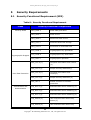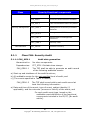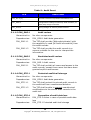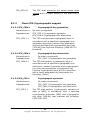
1
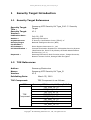
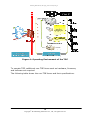
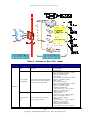
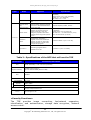
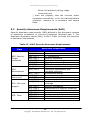
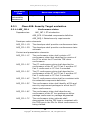
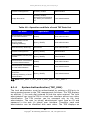
Samsung MFP Security Kit Type_B V1.5 Security Target The TOE is for general users and system administrators. The following three kinds of manuals are provided with this TOE through a CD or the Web: The user guide/troubleshooting guide describe how to install and how to use the MFP. It also provides examples of how to deal with exceptional cases. The security administrator’s guide describes how to use security functions that the TOE provides. It also provides examples of how to deal with exceptional cases. The network administrator’s guide describes how to configure network functions and how to set MFP functions and security functions for administrators. The system software includes security management, security audit log, image overwrite, data flow manager, and HDD encryption. The UI software includes the security UI. The network software includes the security network interface and port/protocol management. Table 3 : Evaluated Software/Firmware for the TOE Software Version System Software - HDD Encryption - Security Management - Security Audit Log - Image Overwrite - Data Flow Manager UI Software - Security UI Interface Network Software - Security Network Interfac e Port/Protocol Management SCX-5835FN/SCX-5935FN V2.01.00.29_SEA31_1.03CCC TSF_NVE_V1.70 TSF_SFM_V1.70 TSF_SAA_V1.70 TSF_IOW_V1.70 TFS_FLW_V1.70 V1.03.01.58SEA31_1.04 TSF_LUI_V1.70 V4.01.18(SCX-5835/5935)_SEA31_1.20 TSF_WUI_V1.70 TSF_NAC_V1.70 The TOE is called the Samsung MFP Security Kit Type_B and is embedded in the MultiXpress SCX-5835FN, SCX-5935FN devices. It performs security functions for Samsung MFPs by using system software, UI software, and network software. The system software transforms the input data into the appropriate format. It also controls and manages the documents that are stored. Data created during printing, scanning, or copying is completely cleared right after the job is finished. This function can be performed by the Image Overwrite function. It also encrypts/decrypts all data stored on the HDD, when a security event occurs, authorized administrators can manage system audit functions, security jobs, TSF data, or configuration on security items. 19 Copyright 2010 Samsung Electronics Co., Ltd., All rights reserved