1
Chapter 3
Using the Console Interface
This chapter describes how to configure and manage the BayStack 350 switch
using the menu-driven console interface (CI). You can access the CI menus and
screens through the console/service port located on the switch back panel. You
can also manage the BayStack 350 switch using Bay Networks Optivity network
management software or any generic SNMP-based management software;
however, you must first assign an IP address to the switch, as described in this
chapter.
Note: If you have a properly configured BootP server in your network, it will
detect the IP address; you will not need to configure the IP address.
See your network management documentation for information about SNMP.
Console Interface
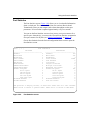
The CI consists of menus and screens that enable you to manage the BayStack 350
switch and monitor its performance. You can manage the switch by using
configuration menus to change its operational parameters. You can monitor the
performance of the switch by using the statistics screen, which displays the
counters of the switch ports.
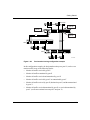
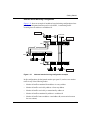
You can access the CI menus and screens in the following ways:
•
•
•
893-00992-D
Locally through a console terminal (must be a VT100-compatible terminal or
a PC running VT100 terminal-emulation software)
Remotely through a dial-up modem connection
In-band through a TELNET session
3-1