1
?
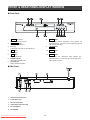
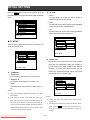
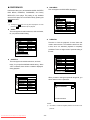
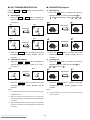
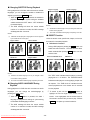
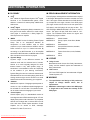
To search by chapter, use the 3 4 5 6 buttons to
highlight the first two digits of the “CHAPTER nn/nn”
section. Once highlighted, use the number keys on
the remote to enter the chapter you want to play.
Presses ENT/PLAY to complete your search selection.
?
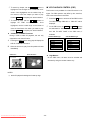
< VCD PLAYBACK CONTROL (PBC)
This function is only available for Video-CD version 2.0 or
higher. The PBC operation may differ by disc, therefore,
refer to the instructions for each disc.
?
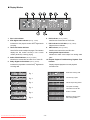
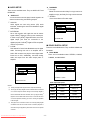
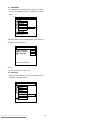
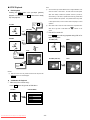
To search by time, use the 3 4 5 6 buttons to
highlight
the
“TIME
nn:nn:nn” section.
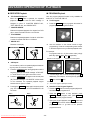
The OSD message “PBC ON” or “PBC OFF” will be
Once
highlighted, use the number keys on the remote to
enter the time frame from which you want to play.
displayed.
?
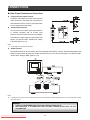
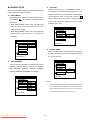
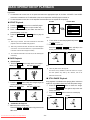
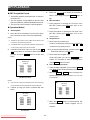
and “GO TO NEXT PAGE” of the PBC menu, if
VCD/Audio CD DIRECT Functions
available.
During a VCD or Audio CD playback, this unit only
VCD PBC MENU Page 1
supports the time search function.
1.
Song 1
Song 2
Song 3
Song 4
Song 5
Song 6
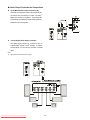
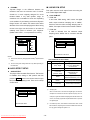
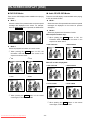
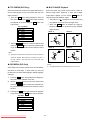
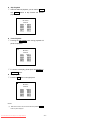
Pressing the DIRECT button during play will display the
OSD for VCD/Audio CD search.
2.
When the time is set, play from this position will start
immediately.
VCD Search
GO TO _ _: _ _
On the PBC menu, the 9SKIP and SKIP: buttons
are dedicated for “GO BACK TO PREVIOUS PAGE”
Presses ENT/PLAY to complete your search selection.
l
Press the PBC button to switch on/off the PBC function.
Audio CD Search
l
GO TO _ _: _ _
VCD PBC MENU Page 2
Song 7
Song 8
Song 9
Song 10
Song 11
Song 12
Digit Buttons
On the PBC menu, all items must be selected and
executed by using the number buttons only.
NOTES:
i
Audio CD playback’s background is start up logo.
Downloaded From Disc-Player.com Sharp Manuals
- 29 -