1
USB Headers
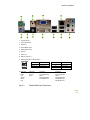
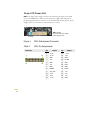
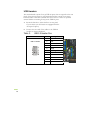
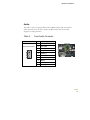
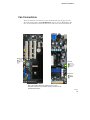
This motherboard contains four (4) USB 2.0 ports that are exposed on the rear
panel of the chassis (Figure 2). The motherboard also contains four 10-pin
internal header connectors onboard that can be used to connect an optional
external bracket containing four (4) more USB2.0 ports.
1.
Secure the bracket to either the front or rear panel
of your chassis (not all chassis are equipped with the
front panel option).
2.
Connect the two ends of the cables to the USB 2.0
headers on the motherboard.
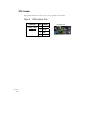
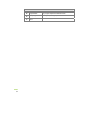
Table 3.
USB 2.0 Header Pins
Connector
USB 2.0 Header
Pin
Signal
1
5V_DUAL
3
Data-
5
Data+
7
GND
9
Empty
Pin
EVGA
26
Signal
2
5V_DUAL
4
Data-
6
Data+
8
GND
10
No Connect