1
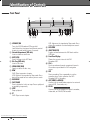
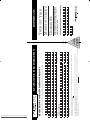
Identification of Controls
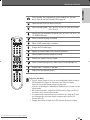
Remote Control
Turns the DVD Recorder+VCR on and off.
- Opens and closes the disc tray in DVD mode.
- Ejects the tape in the VCR deck in VCR mode.
Selects DVD mode.
Selects VCR mode.
Switches between the DVD Recorder+VCR tuner and your TV tuner.
Switches the view on your TV to the DVD Recorder+VCR tuner.
- Selects numbered options in menus.
- Selects TV channels.
- Manually adjusts tracking.
Resets the tape counter in VCR mode.
Press and hold for 3 seconds to switch between Progressive Scan and
Interlace Scan mode.
Accesses DVD disc menus.
Displays or exits the Setup menu.
Edits chapters or splits titles of DVD+R(+RW) discs.
Displays information about the currently loaded disc, VHS tape, or TV
channel.
- œ √…† : Selects menu options.
- PR +/– : Selects channels.
Confirms menu selections.
Skips to the next or previous chapter/track.
- DVD: Searches backward/forward.
- VCR: Rewinds/advances during Stop mode. Press during Play mode for
fast reverse/forward picture search.
Increases or decreases the slow motion speed when playing a DVD or VHS
tape.
- Starts playback.
- Pauses playback or recording temporarily. Press again to exit Pause mode.
Stops playback or recording.
Downloaded From Disc-Player.com Daewoo Manuals
12