1
Chapter 6, Problem Solving
If your radio fails CTCSS/CDCSS tests or the tests don’t run
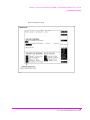
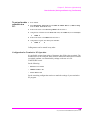
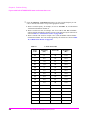
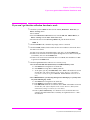
❒ Check the Channel Information menu to see if the CTCSS frequency or tone
code, or CDCSS code word is set up in the appropriate columns.
1. Enter a CTCSS frequency, for example, 91.5 Hz as “CT FR91.5”, in both RX and
TX channel information columns, or
2. Enter a CTCSS tone code, for example, “ZZ” for 91.5 Hz as “CT ZZ” in both RX
and TX channel information columns. The tone codes supported by the software are
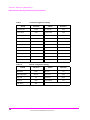
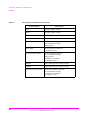
shown in table 17, "CTCSS Tone Codes" on page 248, or
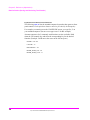
3. Enter a CDCSS code word, for example “023” (octal) in both RX and TX channel
information columns. The code words supported by the software are shown in table
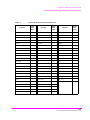
18, "CDCSS Code Words" on page 249.
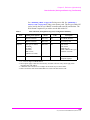
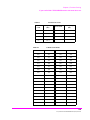
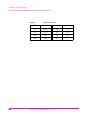
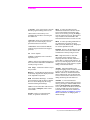
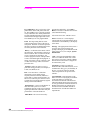
Table 17
248
CTCSS Tone Codes
Tone
Code
Frequency
(Hz)
Tone Code
Frequency
(Hz)
XZ
67
3B
131.8
—
69.3
4Z
136.5
XA
71.9
4A
141.3
WA
74.4
4B
146.2
XB
77
5Z
151.4
SP
79.7
5A
156.7
YZ
82.5
5B
162.2
YA
85.4
6Z
167.9
UB
88.5
6A
173.8
ZZ
91.5
6B
179.9
ZA
94.8
7Z
186.2
ZB
97.4
7A
192.8
1Z
100
M1
203.5
1A
103.5
M2
210.7
1B
107.2
M3
218.1
2Z
110.9
M4
225.7
S:\hp11807a\OPT001\USRGUIDE\BOOK\chapters\problems.fb