1
AR2700 operating manual
To cancel program search
To cancel program search press [MANU] and the display will return to the
original VFO frequency in MANUAL mode.
Transfer of an active frequency to VFO
Should the search process stop on an interesting active frequency, you may
stop the search process and transfer the frequency to VFO by pressing
[SRCH].
The receiver will monitor the active frequency and may be tuned using the
[DIAL] or UP / DOWN keys.
Writing active frequencies to memory
If an interesting active frequency is found while in program search mode, it
may be written to a memory channel.
Press and hold the [ENT] key for more than 1.5 seconds. The AR2700 will
enter MEMORY WRITE MODE, the legends “BANK” and “CH” will flash to
indicate that the receiver is expecting you to accept the memory location or
choose a new location. Initially the first available empty memory channel will
be offered. If you prefer to store the data into a different memory channel use
the UP / DOWN keys, [DIAL] or numeric keypad to make a new selection.
The accept the memory location and write
data to the chosen memory location press
[ENT].
Note: The receiver will return to
PROGRAM SEARCH MODE but will start
at the lowest frequency of the program
search range and start searching again.
For this reason it is recommended that
only a relatively small range of frequencies
are searched / analysed at any time. If this proves a nuisance, then use
MANUAL SEARCH mode so that the search process continues from the
currently displayed frequency. Refer to section 11-1 of this operating manual.
11-4 Reviewing program search upper and lower limits
It is very easy to review the upper and lower frequency limits or program
search banks to make their identification easier.
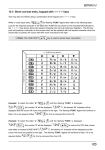
When in program search mode (the
“SEARCH” legend displayed on the LCD)
press [2ndF] [SCAN] to review the upper
and lower limits of the program search
banks. This method is preferable to the
PROGRAM SEARCH MENU as you
cannot accidentally over-write the program
search bank contents.
50