1
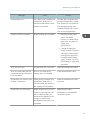
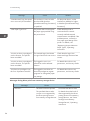
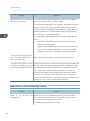
3. Troubleshooting
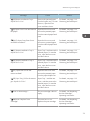
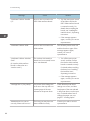
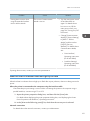
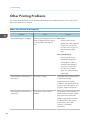
Message
Cause
Solution
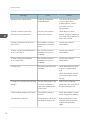
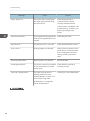
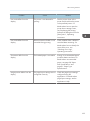
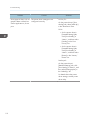
"Unauthorized Copy Prevention
error occurred. Job cancelled."
The resolution is set to a value
less than 600 dpi when
[Unauthorized Copy Prevention]
is specified.
On the printer driver, set the
resolution to 600 dpi or higher,
or deselect [Unauthorized Copy
Prevention].
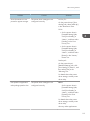
"User Paper Type Error"
The printer does not recognize
the paper type specified using
the printer driver.
Check that the printer is
connected to the network
correctly and bidirectional
communication is enabled. If the
problem persists, confirm the
user paper type settings of the
printer. For details, see
"Registering Unique Names to
Paper Types", Operating
Instructions.
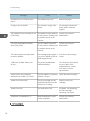
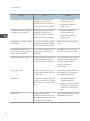
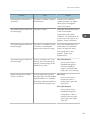
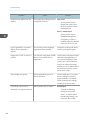
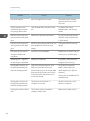
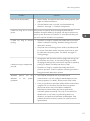
"You do not have a privilege to
use this function. This job has
been cancelled."
The entered Login User Name
Check that the Login User
or Login Password is not correct. Name and Login Password are
correct.
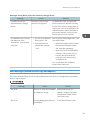
"You do not have a privilege to
use this function. This job has
been cancelled."
The logged in user is not
allowed to use the selected
function.
For details about how to set
permissions, see Security Guide.
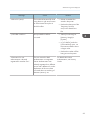
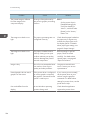
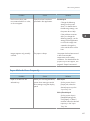
"You have no privilege to use
this func. Operation canceld."
The logged in user does not
have the privileges to register
programs or change the paper
tray settings.
For details about how to set
permissions, see Security Guide.
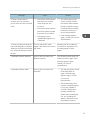
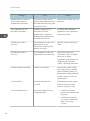
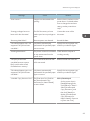
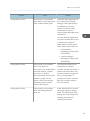
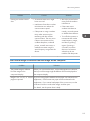
Messages during Direct print from a memory storage device
Message
"99: Error"
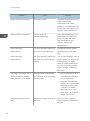
96
Causes
Solutions
This data cannot be printed.
The specified data is either
corrupt or not supported by
the Direct printing function
from memory storage devices.
Check that the data is valid.
For details about the kinds of
data supported by the Direct
printing function from memory
storage devices, see "Direct
Printing from a Memory
Storage Device", Operating
Instructions.