1
Preparing Your Radio For Use
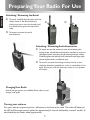
Attaching / Removing the Aerial
Common
1 To attach, carefully align the aerial with the
socket. Screw in the aerial clockwise
(taking care not to cross the thread) until
it is seated firmly against the top of the
radio.
1
2
2 To remove, unscrew the aerial
anti-clockwise.
Attaching / Removing Audio Accessories
1 To attach, remove the accessory cover by unscrewing the
locking screw anti-clockwise (leave cover attached or store in a
safe place). Attach accessory plug by locating over the socket.
Carefully tighten the locking screw clockwise until finger tight
(do not tighten with a screwdriver etc).
2 To remove, unscrew the locking screw by hand in an anticlockwise direction (carefully use a coin or screwdriver if too
tight). Ensure you re-fit the accessory cover so as to protect
the socket.
Charging Your Radio
Several charger options are available. Please refer to your
charger user guide.
Turning your radio on
Turn your radio on by pressing the on / off button on the front of the radio. The radio will bleep and
the LED will illuminate constant yellow for approximately 4 seconds, followed by a second “warble” (if
not disabled by the Dealer when programmed).
7