1
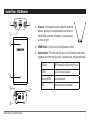
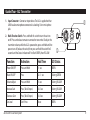
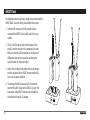
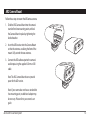
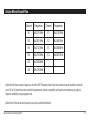
Guided Tour - AL2 Transmitter 1. Input Connector - Connect an input device. The AL2 is supplied with an LM10 lavaliere microphone connected via a locking 3.5mm mini-phone jack. 2. Multi-Function Switch - Press and hold this switch to turn the unit on or off. Press and release to mute or unmute the transmitter. To adjust the transmitter volume, while the AL2 is powered on, press and hold until the power turns off, release the switch, then press and hold the switch for 5 seconds and the Status Indicator will first flash GREEN, then YELLOW. Function Activation Hold Time LED Status Power ON/OFF Press and Hold > 1 sec GREEN Mute ON/OFF Press 0.2 – 1 sec Flashing GREEN Volume Adjust Press and Hold > 5 sec Flashing YELLOW Increase Gain Press (Total 5 steps) > 0.2 sec Flashing YELLOW Decrease Gain Press (Total 5 steps) > 0.2 sec Flashing YELLOW Set Level Don’t Press 10 sec GREEN AirLine Micro Camera System 9