1
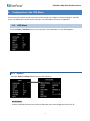
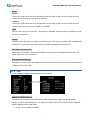
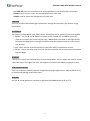
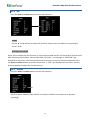
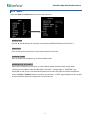
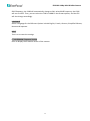
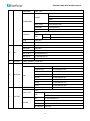
EZH5102 1080p Mini IR Bullet Camera 4.1.7 System Press the Enter / Confirm button to enter the submenu. PAL F / W VER 1.00 DEFECT DET Press to select the DPC (Defective Pixel Correction) level of defect detector. Please notice; do not use this function without cover the lens. The camera will automatically correct pixel defects. Misoperation will cause the abnormal image. CAM TITLE Switch to On and then enter the submenu to set up a camera name displayed on the screen. RS-485 Use the and buttons to select ID, BAUDRATE, PROTOCOL and ID DISPLAY. The default of protocol is EVF-1 (EverFocus). DOUT SCALE: Digital Output Scale Use the and buttons to select FULL or COMP. This function is used to select the value range of auto brightness control. The value range of FULL and COMP is as below: FULL: 0-255 COMP: 16-255 DOUT FORMAT : Digital Output Format DOUT FPS: Frames per Second FREQ: Frequency CVBS There are 4 options including 1080p 30FPS NTSC, 1080p 25FPS PAL, 720p 60FPS NTSC and 720p 50FPS PAL. If you want to change the format and FPS, you should change the FREQ first. Select 12