1
Initial VidyoRoom Setup for HD-50 Rev. B
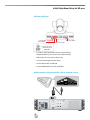
Power Button
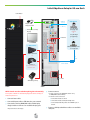
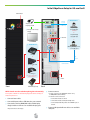
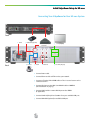
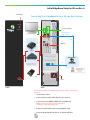
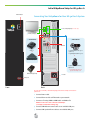
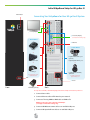
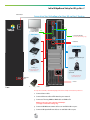
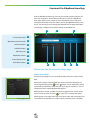
Connecting Your VidyoRoom for Your HD-50 Rev B System
HDMI
VGA
HDMI to TV
TM
3. Primary Display
SERIAL / USB
CABLE
3. Secondary Display
5. Audio Device
(For Data Share viewing only)
ETH0
LINE IN
LINE OUT
Chat 50
2. Ethernet
4. Video Device
OR
Logitech Webcam Pro 9000
(preferred)
Logitech Quickcam Pro 9000
Yamaha PJP-20UR
OR
OR
Konftel 300
Logitech Quickcam Orbit/
Sphere AF
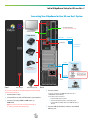
Use only one audio device
between the above
For detailed webcams list
please visit Vidyo.com
USB port
1. Power
Front
VGA2USB (optional)
Back
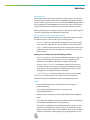
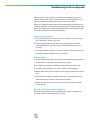
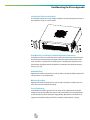
Do not power on the HD-50 unit until Display(s) and Camera are fully connected and powered on.
1. Connect Power cable.
2. Connect Ethernet cable to ETH-O and to your network.
3. Connect to TV using HDMI to HDMI cable or HDMI-to-TV.
NOTE: A second screen can be connected to the VGA port
(2nd display is for Data Share viewing only).
TM
4. Connect USB Webcam camera cable to an available USB port.
5. Connect USB SpeakerPhone cable to an available USB port.
19