1
USER GUIDELINES
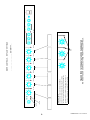
Front Panel Controls and Setting-up the system.
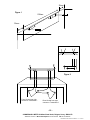
The radio microphone receiver output is connected to the Mixer.
(You may also add a CD or Cassette player or your existing ‘Coomber’ unit or the input from a TV or other existing AV equipment).
The output from the Mixer is fed into the amplifier.
The output from the amplifier drives the loudspeakers.
Because the outputs going into the Mixer from different microphones, and any other
equipment connected as part of the system, are different - and because no two Halls
are the same - all of these levels are adjustable (see below).
Each input to the Mixer needs to be adjusted so that the level of the input going into the
amplifier is ‘balanced’. i.e. So that all the microphones sound the same and that any other
input - Eg. Music from a CD player – does not drown out someone using a microphone.
The overall Mixer output level may then be adjusted before it goes into the Amplifier.
The amplifier output to the loudspeakers may then, also, be adjusted using the two volume
controls.
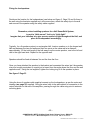
In addition, there are (three) controls that may be used to set ‘Tone’ adjusting Low, Midrange and High frequency sounds;
Set all three of these controls to the mid-way position (12:00 o’clock) to start
with, and then adjust (only slightly) forwards or backwards to suit individual
voice characteristics or Hall acoustics.
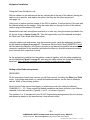
These controls will have been set up correctly by the installers and they should seldom
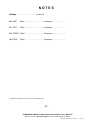
need adjusting. At the back of this guide you will find a sheet on which you can make a
record of the preferred settings, for future use.
If for any reason the controls have been altered from their original settings the following
instructions allow you to change any of the user adjustable controls in order to obtain the best
results for YOUR hall.
-3CONNEVANS LIMITED 54 Albert Road North, Reigate, Surrey RH2 9YR
Tel 01737 247571 Minicom/Textphone 01737 243134 Fax 01737 223475
B40SFSYS2K Hall Soundfield Installation v 2.1 23.05.08