1
Reserving Conferences
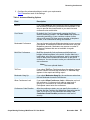
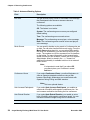
Table 2: Advanced Booking Options
Field
Description
Pin List
In the Web Portal environment, if you select Conference PIN,
the CRS assigns a dynamically-created PIN list to the
conference. You cannot edit the PIN List field.
The CRS dynamically creates a PIN list for each conference.
This PIN list contains only the invitees for that particular
conference. If you specify Conference PIN, you can restrict
conference entry to the invitees only.
As an aside, Meeting Exchange names this PIN list using this
naming convention: cl_conference reference.txt. If
the conference reference is 123456, Meeting Exchange
assigns the cl_123456.txt PIN list to the conference. In
this example, Meeting Exchange grants conference access to
Participants if they enter the correct passcode and a PIN code
which matches any entry in the cl_123456.txt PIN list.
The file cl_123456.txt only contains the PINs of the
invitees to conference 123456. This functionality
automatically occurs when you select Conference PIN.
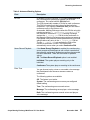
Name Record Playback
If the Name Record Playback is enabled, the conferencing
server prompts all Participants to call out their name before
they enter the conference. Moderators can then play an audio
roll call of attendees. There are are number of possible
values:
Off: The Name Record Playback option is not enabled.
Individual: The system plays a recording only to the
individual.
Conference:The system plays a recording to the conference.
Enter Tone
You can choose to play a tone or a recorded voice message
that Participants hear whenever someone enters a
conference.
The following options are available:
Off: The feature is not active.
System: The conferencing server uses a pre-configured
default setting.
Tone: The conferencing server sounds a tone.
Message: The conferencing server plays a voice message.
Both: The conferencing server sounds a tone and plays a
voice message.
Avaya Meeting Exchange Web Portal 5.1 User Guide
November 2008
23