1
right page (25) of A65_PUMA en, A31008-H5810-A1-1-7619 (22.07.2004, 13:32)
25
Siemens AG 2003, C:\Daten\Siemens\Produkte\A65\output\SUG\A65_SUG_en_040722_te_pk_druck_ohneSAR\Puma_faq.fm
Questions & Answers
If you have any questions regarding the use of your phone, you can contact us at
www.siemens-mobile.com/mobilescustomercare at any time. In addition to this we have listed some
frequently asked questions and answers below.
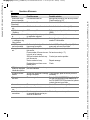
Question
Phone cannot be
switched on.
Possible causes
On/Off key not pressed long
enough.
Flat battery.
Possible solution
Press On/Off key for at least two seconds.
Charge battery. Check charging indicator in
the display.
Deactivate speed search (p. 22).
Switch off display illumination (p. 19).
1) Plug in charger cable, battery is on charge.
2) Charge icon appears after approx. 2 hours.
3) Charge battery.
Contact problem.
Check power supply and connection to the
phone. Check battery contacts and device
plug socket, clean them if necessary, then insert battery again.
No mains voltage.
Use different mains power socket, check
mains voltage.
Wrong charger.
Only use original Siemens accessories.
Battery faulty.
Replace battery.
SIM error.
SIM card not correctly inserted. Check that the SIM card is inserted correctly
(p. 6).
SIM card contacts dirty.
Use a dry cloth to clean the SIM card.
SIM card with wrong voltage.
Use 3 V SIM cards only.
SIM card damaged (e.g. broken). Visually inspect the damage. Have SIM card
replaced by service provider.
No connection to
Weak signal.
Move to higher location, to a window or open
network.
space.
Outside GSM range.
Check coverage area of service provider.
SIM card not valid.
Contact the service provider.
New network not authorised.
Try manual selection or select a different network (p. 22).
Network barring is set.
Check barrings (p. 22).
Network overloaded.
Try again later.
Phone loses network. Signal too weak.
Reconnection to another service provider is
automatic (p. 22). Switching the phone off and
on may speed this up.
Calls not possible.
2nd line set.
Set first line ‘ (p. 22).
New SIM card inserted.
Check for new restrictions.
Charge limit reached.
Reset limit with PIN 2 (p. 14).
Credit used up.
Load credit.
Insufficient standby
Speed search active.
time.
Display illumination switched on.
Charging error (charge Battery totally discharged.
icon not displayed).
VAR Language: en; VAR issue date: 040405
Questions & Answers