1
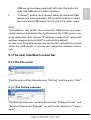
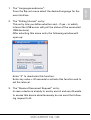
First set the desired language for the user interface:
File > Setting > Languages:
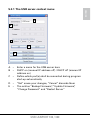
A
B
D
A –
B –
C –
D –
E –
E
C
F
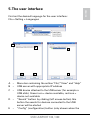
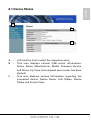
Menu bar containing the entries “File“, “View“ and “Help“
USB server with appropriate IP address
USB device attached to the USB server (for example a
USB stick). Green icon = device available, red icon =
device not available
“Search“ button: by clicking (left mouse button) this
button the search for devices connected to the USB
server will be started
“Config“ (configuration) button (only shown when the USB LANPORT 100 / 400
ENGLISH
5. The user interface