1
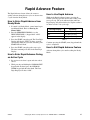
Rapid Advance Feature
The Rapid Advance feature allows the owner to
quickly advance through active cycles or advance into
a cycle from the Ready Mode.
How to Enter Rapid Advance from
Ready Mode
1. If control is in Ready Mode, control must be put
into Manual Mode. Refer to Entering the
Manual Mode.
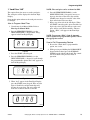
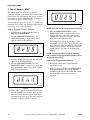
2. Press the PERM PRESS/WARM (∧) or the
DELICATES/COLD (∨) keypad until “rAPd”
appears in the display.
3. Press the START (enter) keypad. The Four-Digit
Display will display “FFIL” for three seconds
and will then show the cycle time remaining. The
START LED will flash.
4. Press the START (enter) keypad to start cycle.
The time remaining will show in the Four-Digit
Display.
How to Use Rapid Advance
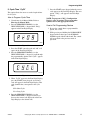
While in the Rapid Advance feature, pressing the
START (enter) keypad will advance the washer to the
next cycle step. The cycle indicator lights and FourDigit Display will show which cycle step the washer is
in. Refer to Table 7 for cycle steps.
Four-Digit Display
Cycle Step
FFIL
Wash Fill Cycle Step
rFIL
Rinse Fill Cycle Step
FSPn
Final Spin Cycle Step
Table 7
Continue pressing the START (enter) keypad until the
cycle is completed.
How to Exit Rapid Advance Feature
Advance through the cycles until reaching the Ready
Mode.
How to Enter Rapid Advance During
an Active Cycle
1. Be certain service door is open and coin vault is
closed.
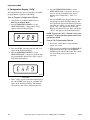
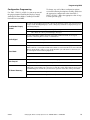
2. While pressing and holding the NORMAL/HOT
keypad with one hand, press the NORMAL/
WARM keypad with the other hand. The FourDigit Display will show “rAPd”.
200944
© Copyright, Alliance Laundry Systems LLC – DO NOT COPY or TRANSMIT
27