1
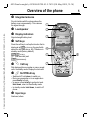
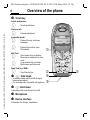
A55 Piranha english, A31008-H5750-A1-2-7619 (28. May 2003, 12:16) Overview of the phone 6 c Scroll key In lists and menus: G Scroll up and down. G Volume adjustment. © Siemens AG 2002, \\Nt4\_Proj_7\Siemens\ICM_MP_CCQ_S_UM_RUST\10210-001_vor-Ort-Ein- During a call: s _ In standby mode: Press at the top: read new message. E F Press at the bottom: open Phonebook. Edit Text: G G Short press at top or bottom: Move cursor character by character. Long press at top or bottom: Move cursor word by word. Read Text (e.g. SMS): G d * Hold down • In standby mode: switch on/off all signal tones (except alarm). • For incoming calls: only switch off ringtones. e Scroll line by line. # Hold down In standby mode: switch key lock on/off. f Microphone g Device interface Connection for charger, headset etc. g Service provider 17.02.2003 09:15 New SMS Menu 1 2abc 3 def 4 ghi 5 jkl 6mno 7pqrs 8 tuv 9wxyz 0