1
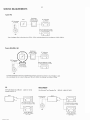
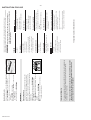
In North and South America the frequency step between adjacent
channels in the AM and FM band are 10 KHz and 100 KHz
respectively. In the rest of the world this step is 9 KHz and
50 KHz. Usually the frequency step has been preset in the factory
for your area.
1. Check that the set is in the TAPE/OFF position and switched off.
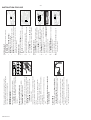
2. To select 9KHz: press simultaneously, PROG and SEARCH §.
Release the controls only when you switch on the set.
• To select 10KHz: press simultaneously, PROG and BAND.
Release the controls only when you switch on the set.
™ When tuning to radio stations, the display shows tuning in
either steps of 9 or 10.
™ All preset stations will be affected and you may need to
reprogramme your presets.
Changing tuning grid (some versions only)
TUNING
Safety information
• Place the set on a hard and flat surface so that the system does
not tilt. Make sure there is adequate ventilation to prevent the
system from overheating.
• The mechanical parts of the set contain self-lubricating bearings
and must not be oiled or lubricated.
General maintenance
• Do not expose the set, batteries, CDs or cassettes to humidity,
rain, sand or excessive heat caused by heating equipment or
direct sunlight.
• To clean the set, use a soft, slightly dampened chamois leather.
Do not use any cleaning agents containing alcohol, ammonia,
benzene or abrasives as these may harm the housing.
TUNING TO RADIO STATIONS
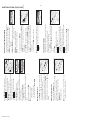
1. Select CD source.
™
and
are displayed briefly,
This CD player plays Audio Discs including CD-Recordables and
CD-Rewritables.
PLAYING A CD
Tuning to preset stations
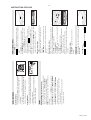
Press PRESET 4 or 3 until the desired preset station is
displayed.
PLAY
STOP
CD
if
BAT
LOW T
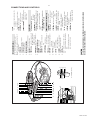
Programming radio stations
You can store up to a total of 30 radio stations in the memory.
1. Tune to your desired station (see Tuning to radio stations).
2. Press PROG to activate programming.
– Display: PROGRAM flashes.
3. Press PRESET 4 or 3 once or more to allocate a number from
1 to 30 to this station.
4. Press PROG again to confirm the setting.
– Display: PROGRAM disappears, the preset number and the
frequency of the preset station are shown.
5. Repeat the above four steps to store other stations.
• You can overwrite a preset station by storing another frequency
in its place.
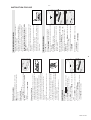
To improve radio reception
– For FM, pull out the telescopic aerial. Incline and turn the aerial.
Reduce its length if the signal is too strong (very close to a
transmitter).
– For MW (AM), the set is provided with a built-in aerial so the
telescopic aerial is not needed. Direct the aerial by turning the
whole set.
1. Select TUNER source.
™
is displayed briefly and then the radio station
frequency, waveband and, if programmed, a preset number is
shown.
2. Press BAND once or more to select your waveband.
3. Press SEARCH ∞ or § (for AZ2035 model only: or on the
remote control TUNING ∞ or §) and release when the
frequency in the display starts running.
™ The tuner automatically tunes to a station of sufficient
reception. Display shows
during automatic tuning.
™ If an FM station is received in stereo, STEREO is shown.
4. Repeat step 3 if necessary until you find the desired station.
• To tune to a weak station, press SEARCH ∞ or § briefly and
repeatedly until you have found optimal reception.
DE
MO
¥¥¥
BATT
LOW
PROG
SEAR
CH
PROGRAM
SEAR
CH
BATT
LOW
¥¥¥
BAND
PRES
ET
AM
FM
FM
STEREO
STER
EO
41
∑
GENERAL INFORMATION
INSTRUCTION FOR USE
3-3
PCS 107 275